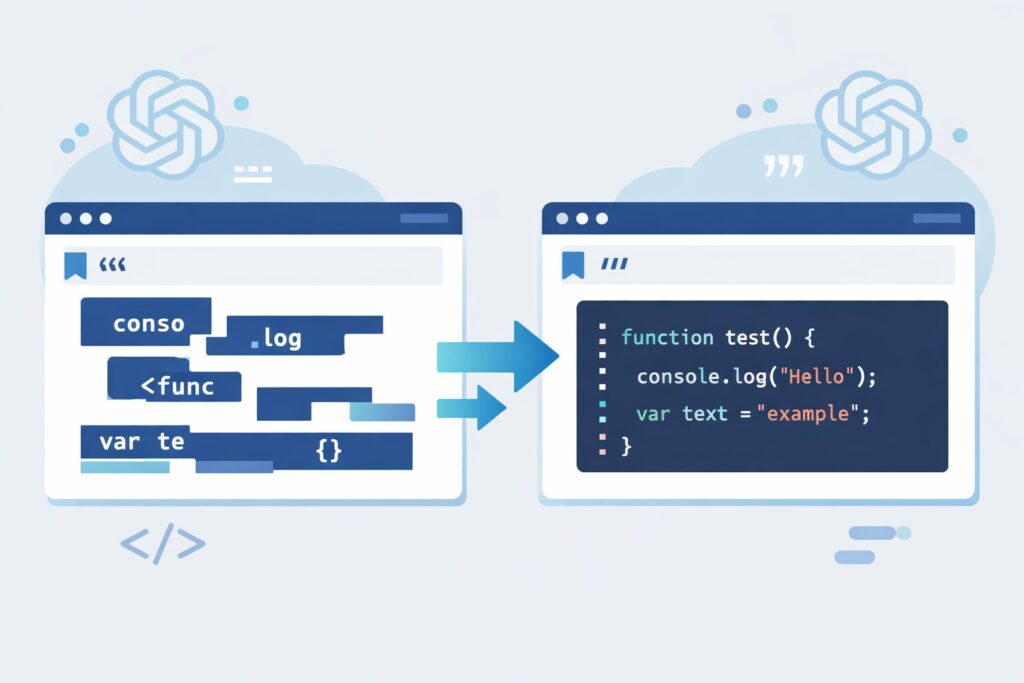
- Abstract / Overview
- 0. Introduction: What Breaks, and Why It Matters
- 1. Markdown Code Blocks: A Minimal Specification Review
- 2. Why Nested Code Blocks Break: Specification vs. Reality
- 3. LLM-Specific Issues: Output Behavior Beyond the Specification
- 4. Experiments (Overview): Which Approaches Were Practically Stable?
- 5. Result: Rule based on Indented Style
- 6. Why the Indented Style Was Chosen (Specification + Practical Operation)
- 7. Bookmarklet and Practical Notes (Limitations and Exceptions)
- 8. Summary
- References
Abstract / Overview
This article examines a common but frustrating problem: Markdown output generated by LLMs (such as ChatGPT, Gemini, and Claude) often breaks when code blocks are nested.
Rather than presenting a “correct” or ideal form of Markdown, this article focuses on practical stability. By looking at both the Markdown specification and real-world implementations, it proposes a realistic operational approach that minimizes breakage when working with LLM-generated Markdown.
The goal is not theoretical purity, but a solution that survives copying, pasting, and reuse across common Markdown environments.
0. Introduction: What Breaks, and Why It Matters
Although the examples in this article were primarily tested using ChatGPT, similar behavior can be observed across many LLMs.
When users ask an LLM to:
- “Explain this in Markdown”
- “Output this as a Markdown code block”
the following problems frequently occur:
- Nested code blocks unexpectedly close, causing subsequent text to escape the block
- The output may look correct in the chat UI, but breaks after copy & paste
- Reuse becomes difficult in environments such as Obsidian, GitHub, or VS Code previews
At the same time, users often need code blocks for copying and reuse, making this problem hard to avoid.
The goal of this article is to:
- Base the discussion on the Markdown specification (especially fenced code blocks)
- Account for LLM output behavior and chat UI rendering quirks
- Propose a Markdown usage pattern that is less likely to break in practice
This is one practical answer, not a final or universal solution.
1. Markdown Code Blocks: A Minimal Specification Review
1.1Indented Code Blocks (Four Spaces)
In the original Markdown syntax described by John Gruber, code blocks are represented by:
- Four leading spaces (or one tab) at the beginning of each line
This is commonly referred to as an indented code block.
Characteristics:
- Very old and widely supported
- Fewer implementation differences across parsers
- Difficult or impossible to specify a language for syntax highlighting
- Supports nesting naturally, but at the cost of readability and editing convenience
(See Figure 1: Conceptual diagram of indented code blocks)
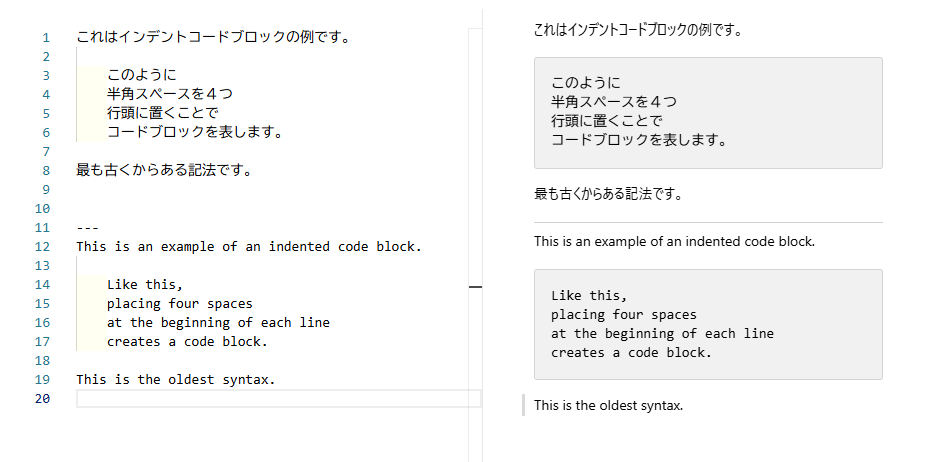
Figure 1: Conceptual diagram of indented code blocks)
1.2 Fenced Code Blocks (“` / ~~~)
In CommonMark and GitHub Flavored Markdown (GFM), fenced code blocks are formally defined using:
- Triple backticks: “`
- Triple tildes: ~~~
(Using four or more characters is also allowed.)
Key points:
- Opening and closing fences must use the same delimiter type
- The fence length must be three or more characters
- Rules exist for handling fence markers that appear inside code blocks
- Optional language identifiers may follow the opening fence
(See Figure 2: Structure of fenced code blocks in CommonMark — opening fence, language identifier, closing fence)
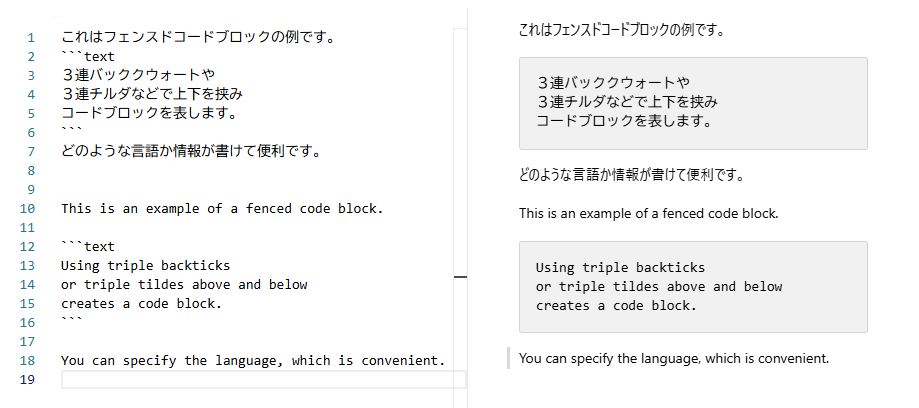
Figure 2: Structure of fenced code blocks in CommonMark — opening fence, language identifier, closing fence
2. Why Nested Code Blocks Break: Specification vs. Reality
2.1 The Core Issue: Fence Delimiter Collision
The most common cause of broken nested code blocks is a delimiter collision.
A typical problematic pattern looks like this:
- The outer code block uses triple backticks (
```) - The inner code block also uses triple backticks (
```)
From the perspective of many Markdown parsers, this creates ambiguity.
When a parser encounters triple backticks inside an existing triple-backtick block, it may interpret them not as the start of an inner block, but as the end of the outer block.
Depending on the implementation, context, and fence length, this can result in:
- The outer code block closing prematurely
- Subsequent paragraphs or headings being rendered as code
- Or, conversely, code being rendered as normal text
The situation becomes even more fragile when the inner fenced code block includes a language specifier, such as:
```javascript(Note: The closing fence is intentionally omitted here to avoid breaking the surrounding code block in this article.)
In many implementations, a fenced block with a language tag is treated as a strong opening signal.
As a result, when the closing triple backticks appear, both the inner and outer blocks may be terminated at once.
This is why nested Markdown code blocks often “collapse” visually or structurally.
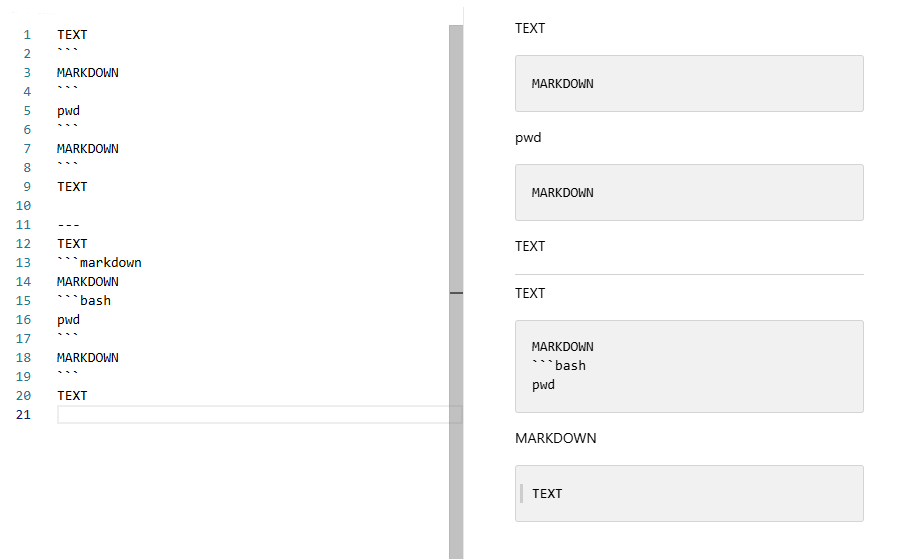
Figure 3: Inner fenced block appears inside an outer block → the outer block is closed unexpectedly
2.2 The Reality of “Markdown Dialects”
Markdown does not have a single, universal implementation.
In practice, it exists as a family of closely related—but not identical—dialects:
- CommonMark
- GitHub Flavored Markdown (GFM)
- Pandoc
- Editor-specific renderers (Obsidian, VS Code preview, etc.)
While code blocks are relatively standardized, edge cases still differ depending on:
- Fence nesting depth
- Interactions with inline code or blockquotes
- Parser and post-processor behavior
As a result, behavior that appears correct in one environment may break in another, especially after copy-and-paste.
This article does not attempt to guarantee correctness in every possible Markdown environment.
Instead, the goal is more practical:
To propose a workflow that is unlikely to break in most major Markdown environments used today.
3. LLM-Specific Issues: Output Behavior Beyond the Specification
This problem cannot be fully explained by the Markdown specification alone.
In practice, LLM-generated Markdown (ChatGPT, Gemini, Claude, etc.) exhibits several output-specific behaviors that make nested code blocks particularly fragile:
- Triple backticks (
```) are overwhelmingly favored due to training data bias - Inner code blocks tend to break at the moment the innermost block is closed
- Maintaining the state of an outer code block across long outputs is unreliable
As a result, even Markdown that is technically valid under the specification may be rendered incorrectly at a high frequency when generated by LLMs.
An additional complication is the mismatch between:
- what the chat UI renders on screen, and
- what is actually copied as plain text.
In other words:
What looks correct in the chat interface is not necessarily safe to reuse.
A typical failure path looks like this:
LLM output
   ↓
Chat UI rendering
   (already broken or ambiguous)
   ↓ user tries to copy
Chat UI–specific structure mixed in
   ↓ paste
Markdown parser
   → further breakage
Figure 4. Conceptual diagram: divergence across chat rendering, copied text, and Markdown re-parsing.
Breakdown often occurs before copying: LLM output is already fragile at the Chat UI stage, and copying the rendered chat may introduce UI-specific artifacts that further corrupt Markdown structure.
4. Experiments (Overview): Which Approaches Were Practically Stable?
We tested multiple nested code block patterns to evaluate which approaches remained usable in practice.
The overall trends were as follows:
- Indented code blocks (four spaces) are robust, but suffer from poor readability and lack of language annotation
- Using the same delimiter (
```) for both outer and inner blocks leads to a high failure rate - Separating delimiters between outer and inner blocks significantly improves stability
However, approaches that rely on:
- carefully crafted delimiter lengths, or
- persistent system-level instructions (e.g., Custom GPT initialization + frequent rule re-injection)
are generally not suitable for casual or general users.
For this reason, this article focuses on operationally realistic rules rather than theoretically minimal ones.
The detailed experimental logs—including raw test text and screenshots—are folded into the accordion sections below.
Readers interested only in conclusions can safely skip them.
In this section, several patterns for nested code blocks were tested.
Detailed experimental results are folded into the accordion sections below.
They include the exact test texts used and many screenshots of rendering results.
Readers who are interested in the details can expand those sections.
Others may skip them and proceed directly to the conclusion.
4.1 Six test patterns
Texts used for the six nested code block patterns.
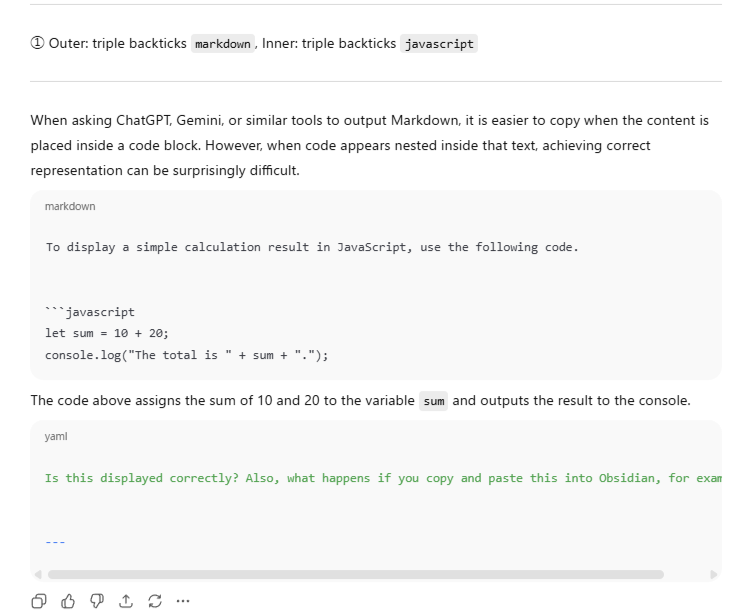
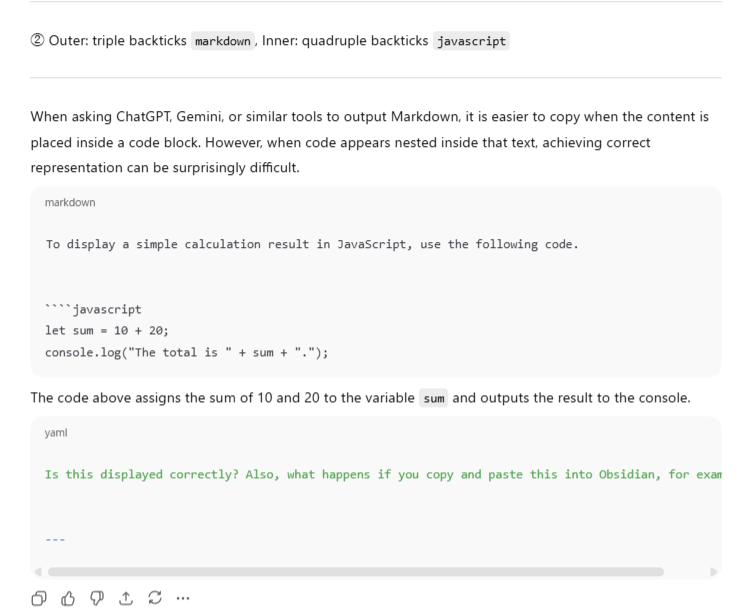
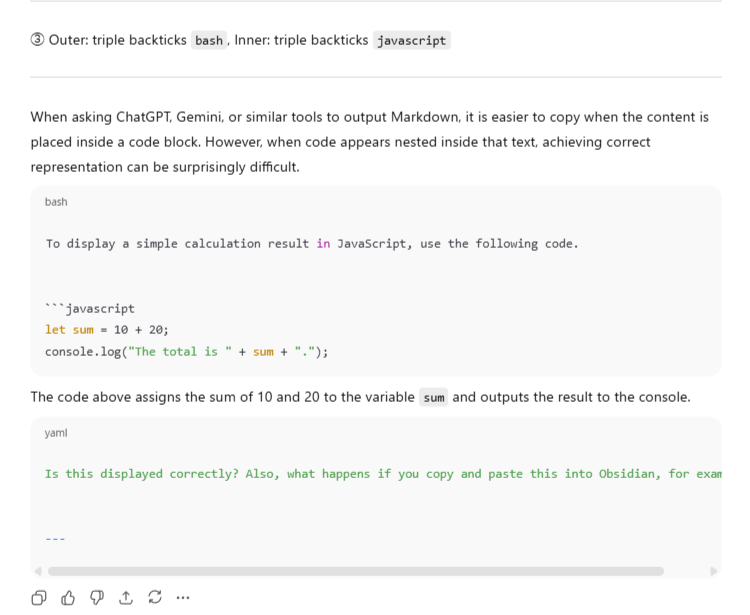
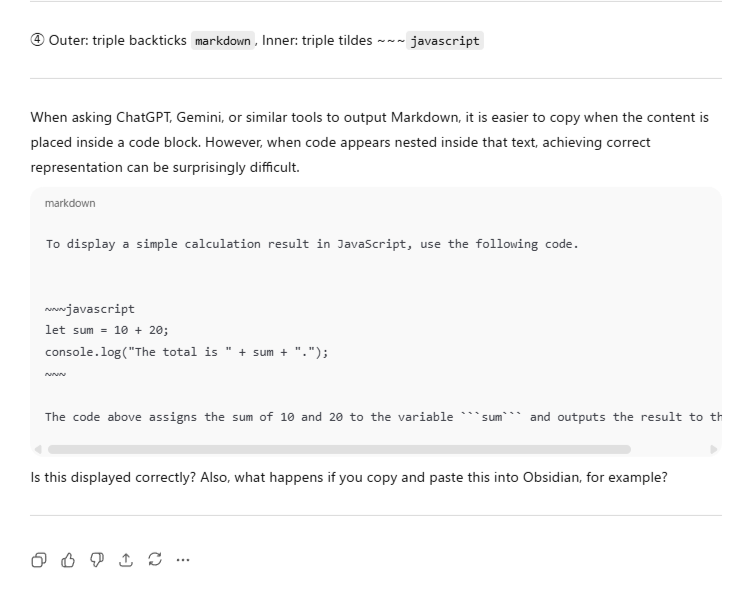
4.2 ChatGPT Web UI screenshots
Rendering results as displayed in ChatGPT.
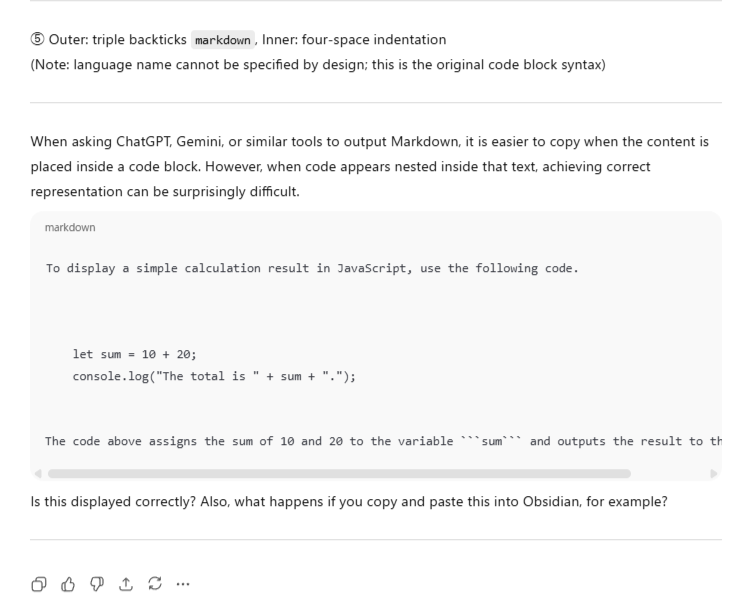
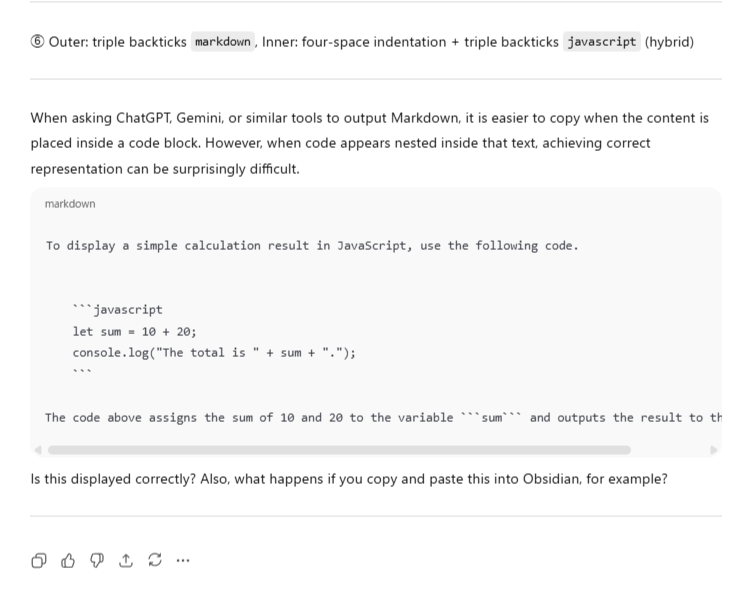
Cases 1–3 did not produce usable results.
Only Cases 4–6 were selected for the copy-and-paste tests.
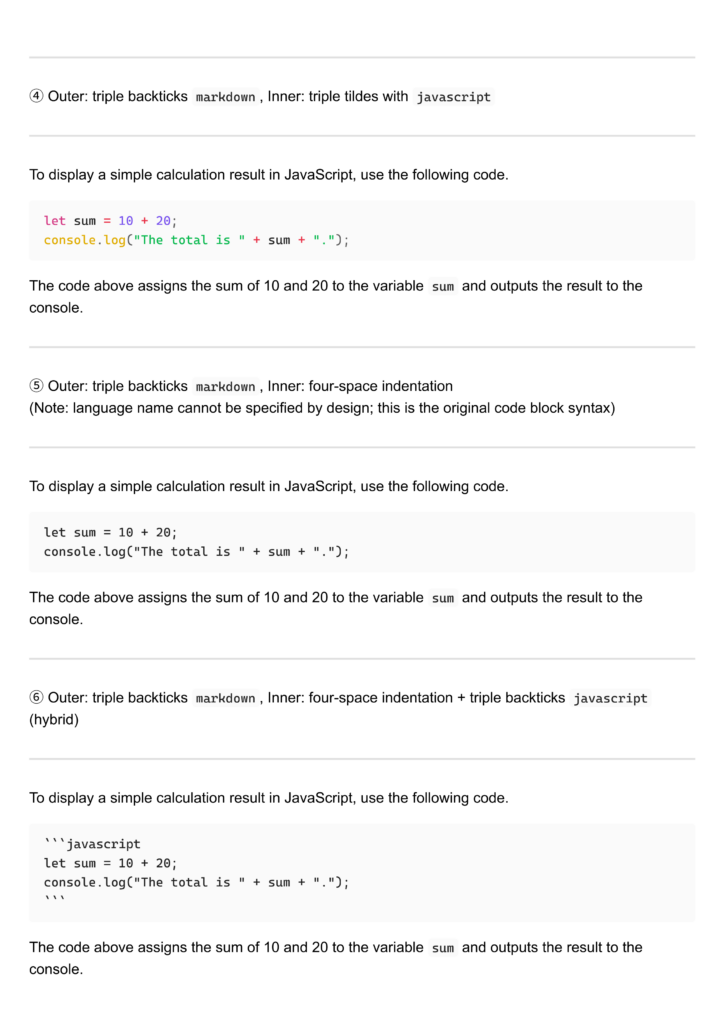
4.3 Obsidian paste results
Rendering results after pasting into Obsidian.
Among them, Cases 4 and 5 remained as the final practical candidates.
Subject: Markdown nested code block rendering test (English version)

---


①  Outer: triple backticks `markdown`, Inner: triple backticks `javascript`

---

When asking ChatGPT, Gemini, or similar tools to output Markdown, it is easier to copy when the content is placed inside a code block. However, when code appears nested inside that text, achieving correct representation can be surprisingly difficult.

````markdown
To display a simple calculation result in JavaScript, use the following code.


```javascript
let sum = 10 + 20;
console.log("The total is " + sum + ".");
````

The code above assigns the sum of 10 and 20 to the variable `sum` and outputs the result to the console.

`````
Is this displayed correctly? Also, what happens if you copy and paste this into Obsidian, for example?


---

②  Outer: triple backticks `markdown`, Inner: quadruple backticks `javascript`

---
When asking ChatGPT, Gemini, or similar tools to output Markdown, it is easier to copy when the content is placed inside a code block. However, when code appears nested inside that text, achieving correct representation can be surprisingly difficult.

```markdown
To display a simple calculation result in JavaScript, use the following code.


````javascript
let sum = 10 + 20;
console.log("The total is " + sum + ".");
`````

The code above assigns the sum of 10 and 20 to the variable `sum` and outputs the result to the console.

````
Is this displayed correctly? Also, what happens if you copy and paste this into Obsidian, for example?


---

③  Outer: triple backticks `bash`, Inner: triple backticks `javascript`

---
When asking ChatGPT, Gemini, or similar tools to output Markdown, it is easier to copy when the content is placed inside a code block. However, when code appears nested inside that text, achieving correct representation can be surprisingly difficult.

```bash
To display a simple calculation result in JavaScript, use the following code.


```javascript
let sum = 10 + 20;
console.log("The total is " + sum + ".");
````

The code above assigns the sum of 10 and 20 to the variable `sum` and outputs the result to the console.

````
Is this displayed correctly? Also, what happens if you copy and paste this into Obsidian, for example?


---

④  Outer: triple backticks `markdown`, Inner: triple tildes ~~~`javascript`

---
When asking ChatGPT, Gemini, or similar tools to output Markdown, it is easier to copy when the content is placed inside a code block. However, when code appears nested inside that text, achieving correct representation can be surprisingly difficult.

```markdown
To display a simple calculation result in JavaScript, use the following code.


~~~javascript
let sum = 10 + 20;
console.log("The total is " + sum + ".");
~~~

The code above assigns the sum of 10 and 20 to the variable ```sum``` and outputs the result to the console.
````

Is this displayed correctly? Also, what happens if you copy and paste this into Obsidian, for example?

---

⑤  Outer: triple backticks `markdown`, Inner: four-space indentation
(Note: language name cannot be specified by design; this is the original code block syntax)

---

When asking ChatGPT, Gemini, or similar tools to output Markdown, it is easier to copy when the content is placed inside a code block. However, when code appears nested inside that text, achieving correct representation can be surprisingly difficult.

````markdown
To display a simple calculation result in JavaScript, use the following code.


    let sum = 10 + 20;
    console.log("The total is " + sum + ".");


The code above assigns the sum of 10 and 20 to the variable ```sum``` and outputs the result to the console.
````

Is this displayed correctly? Also, what happens if you copy and paste this into Obsidian, for example?

---

⑥  Outer: triple backticks `markdown`, Inner: four-space indentation + triple backticks `javascript` (hybrid)

---

When asking ChatGPT, Gemini, or similar tools to output Markdown, it is easier to copy when the content is placed inside a code block. However, when code appears nested inside that text, achieving correct representation can be surprisingly difficult.

````markdown
To display a simple calculation result in JavaScript, use the following code.


    ```javascript
    let sum = 10 + 20;
    console.log("The total is " + sum + ".");
    ```

The code above assigns the sum of 10 and 20 to the variable ```sum``` and outputs the result to the console.
````

Is this displayed correctly? Also, what happens if you copy and paste this into Obsidian, for example?

---
5. Result: Rule based on Indented Style
5.1 Rule(English prompt)
## Rules for nested code blocks
Inside a fenced code block, display any inner code using the indented style (4 spaces).
Do not use fenced code blocks inside another fenced code block.A bookmarklet is provided to re-insert this rule when needed.
Note
Some tuning may be required depending on your environment.
6. Why the Indented Style Was Chosen (Specification + Practical Operation)
Based on the experimental results presented in Chapter 4, this section explains why the indented style was ultimately adopted as the final rule in Chapter 5, from both a specification and an operational perspective.
Triple tildes (~~~)
- Language identifiers can be specified, which improves readability
- Different delimiters can be used for outer and inner blocks, avoiding fence collisions
- In practice, it is difficult to make standard ChatGPT consistently follow this rule with a single prompt
Once a fenced code block is involved, LLMs strongly default to using triple backticks (```), reflecting patterns deeply embedded in their training data.
In addition, there is a possibility that post-processing steps in the LLM output pipeline automatically normalize fences back to triple backticks, even if triple tildes were originally specified.
Indented style
- Works reliably across almost all Markdown environments
- Clearly distinguishing between fenced code blocks and indented code blocks makes prompt instructions easier to write and understand
- Less susceptible to interference from post-processors
In short, the indented style provides a well-balanced solution in terms of:
- not violating the Markdown specification
- allowing instructions to be re-applied only when needed via a bookmarklet
- being easier for LLMs to follow consistently
That said, using triple tildes for fenced code blocks remains an attractive option.
The author personally uses the triple-tilde approach frequently in Custom GPT environments, and exploration in this direction will likely continue in the future.
7. Bookmarklet and Practical Notes (Limitations and Exceptions)
This section describes the intended use of the bookmarklet and its limitations.
- To use the bookmarklet, drag the provided link to your browser’s bookmark bar on a desktop environment.
Bookmarklet English Version: 4spCB_en
If your device (such as a tablet or smartphone) does not allow drag-and-drop bookmark creation, create a dummy bookmark and manually edit its address to insert the code.
Because the ChatGPT Web UI may change over time, some adjustments may become necessary. Please understand that such changes are outside the author’s control.
When clicked before requesting a Markdown output, the bookmarklet inserts an additional instruction at the beginning of the current prompt, instructing the LLM to use the indented style for nested code blocks.
This allows the rule to be applied only when necessary, rather than enforcing it globally.
A separate page provides a detailed explanation of the bookmarklet itself. Please refer to that page if needed. - Due to the nature of LLMs, perfect reproducibility cannot be guaranteed.
Even with carefully designed prompts, 100% consistent output is not achievable in principle. - In simple responses, LLMs often avoid wrapping the entire output in a Markdown code block, which reduces the risk of breakage.
- Even when rules are re-injected via the bookmarklet, their effect tends to decay over several turns.
Therefore, when stability is critical, it is recommended to re-apply the rule each time using the bookmarklet. - Similar functionality could also be implemented using browser extensions instead of bookmarklets.
- Individual customization needs will vary, and exceptions cannot be fully eliminated.
For this reason, users are encouraged to freely modify the bookmarklet to suit their own workflows.
8. Summary
- Nested code block breakage arises from the interaction between Markdown specifications and LLM-generated output
- In practical use, a rule that standardizes inner code blocks to the indented style tends to be the most stable across major environments
- The triple-tilde approach may still be viable in controlled environments such as Custom GPTs, and further exploration in that direction remains worthwhile
References
- CommonMark Project, The CommonMark Specification(CommonMark Spec Version 0.31.2 (2024-01-28))https://spec.commonmark.org/0.31.2/
- GitHub, GitHub Flavored Markdown Spec(GFM Spec Version 0.29-gfm (2019-04-06))https://github.github.com/gfm/
- John Gruber, Markdown: Syntax(Daring Fireball)https://daringfireball.net/projects/markdown/syntax
This site is currently updated mainly in Japanese.
Some articles may be expanded in English in the future.
NoaRecord is a personal project focused on practical, experience-based use of generative AI.
The site primarily covers topics such as Custom GPTs, prompt design, and small supporting tools like bookmarklets—aimed at readers ranging from beginners to intermediate users.
Some articles are extended or supplemented over time as new experiments and findings are added.
Rather than providing definitive answers, the goal is to document real-world behavior, limitations, and workable approaches when using LLMs in practice.
Additional tutorials and case studies may be published in the future.
Details and publication timing are not fixed.
If you find the content useful, following or sharing the official X account is appreciated.
Official: @NoaRecord